HitPaw Photo AI Review– Features, Pricing, Pros & Cons Explained
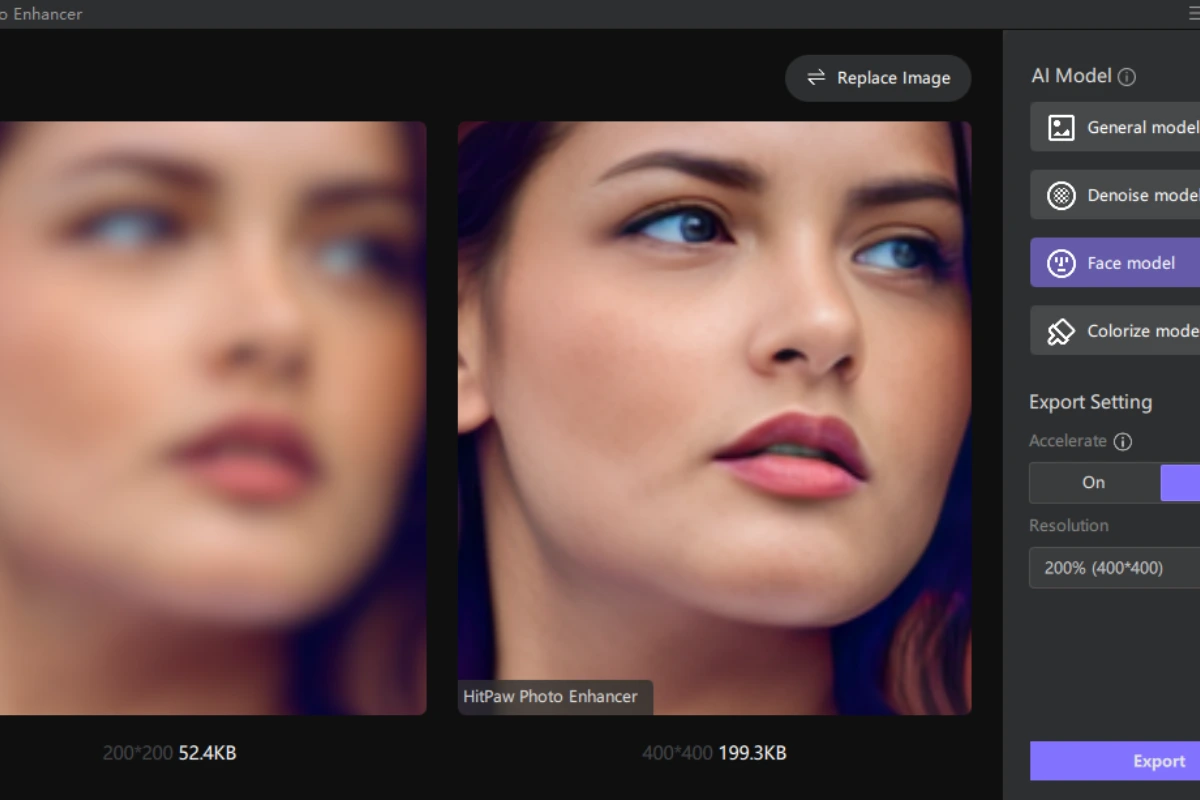
In the world of photo editing tools, HitPaw Photo AI (also called HitPaw FotorPea) has been gaining a lot of attention. If you’ve ever wanted a tool that can make blurry photos sharp, remove backgrounds, colorize old images, and enhance picture quality with just a click, then this review is for you. In this article, we talk about what HitPaw Photo AI is, how it works, its features, pricing, pros and cons, and whether it’s really worth your money and time.
What Is HitPaw Photo AI?
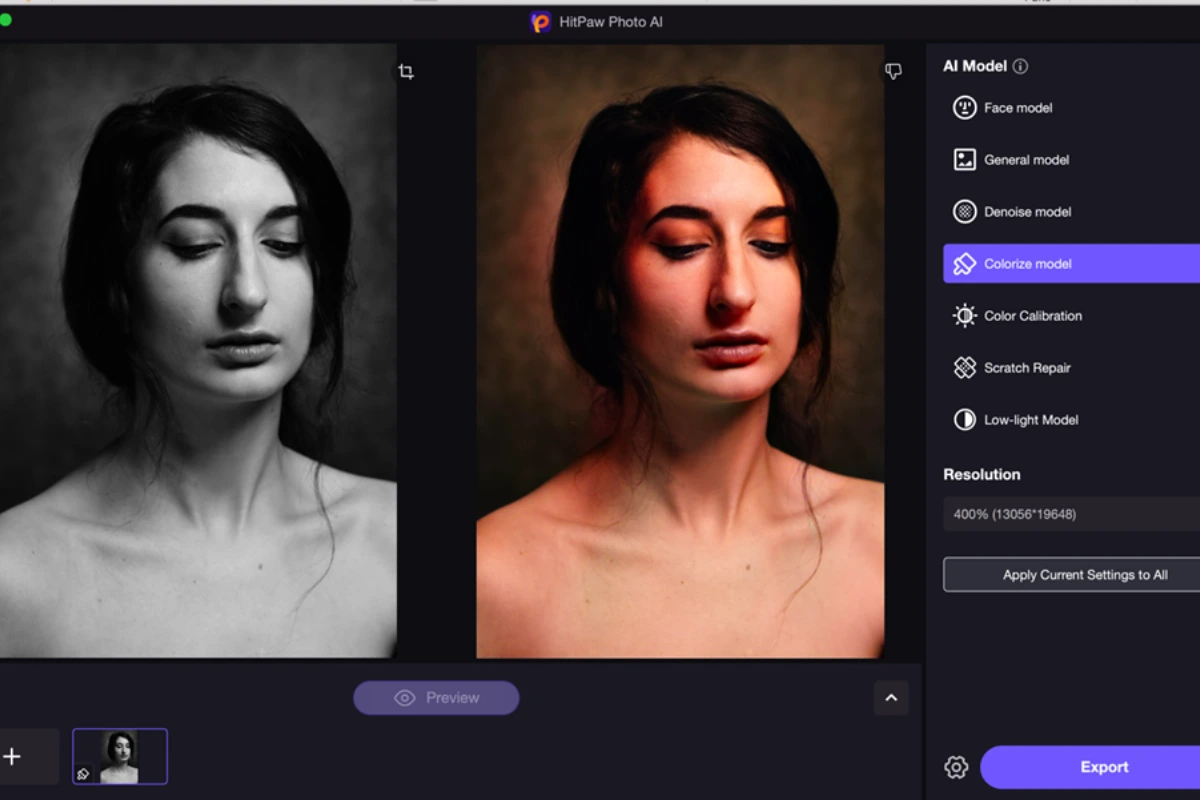
HitPaw Photo AI is an AI-powered photo editing tool that helps users improve and enhance the quality of images without needing complicated software skills. It uses artificial intelligence to automatically fix blurry photos, increase resolution, enhance colors, remove backgrounds, and even restore old and damaged pictures. This tool is available as a desktop app for Windows and Mac and also has an online version that works in a browser.
In simple words, you don’t need to be a photo expert to use this. Just upload your photos, choose the right tool, and the AI does the rest.
Key Features in HitPaw Photo AI
Here are the main functions that make HitPaw Photo AI popular:
🖼️ AI Photo Enhancement
HitPaw uses smart AI to automatically improve your photo’s clarity, colors, and details. It makes photos look sharper and richer without a lot of manual editing.
📸 Upscale & Resolution Boost
With this tool, you can increase photo resolution up to 8K or even higher, meaning low-quality images can become crisp and clear.
👩🎨 Image Restoration
If you have old photos with scratches, fading colors, or blur, HitPaw Photo AI can restore them almost like new.
🖌️ Background Removal
Want to remove the background from a picture for YouTube thumbnails, product photos, or designs? HitPaw AI can do it fast and automatically.
🧠 Multiple AI Models
The software provides several AI models that are specialized to handle different photo enhancement needs like face enhancement, color correction, noise reduction, and more.
📦 Batch Processing
You can process multiple photos at once, saving time if you have many images to enhance.
HitPaw Photo AI Pricing & Plans
HitPaw Photo AI (FotorPea) offers several pricing options depending on how often you plan to use it:
💸 Subscription & License Options
-
1-Month Plan: Around $22.39 per month, access to full features.
-
1-Year Plan: Around $90.39 per year, best for regular users.
-
Perpetual License (Lifetime): Around $129.99, a one-time payment with no renewal.
Some websites also list different pricing options, including discounts and occasional sales, so actual prices can vary slightly.
🆓 Free Version & Trial
HitPaw provides limited free tools online, so you can try a few features before paying. The free version usually comes with limits like watermarks or restricted downloads.
Wondershare Filmora Review: Price, Features, How to Use, Pros and Cons
Real User Experience
👍 What People Like
✔︎ Easy to use: Even beginners can use it without tutorial videos.
✔︎ Great AI results: Photos become clearer and more vibrant with little effort.
✔︎ Batch processing: Saves time when working with many pictures.
✔︎ Online version available: You don’t always need to install heavy software.
👎 What People Don’t Like
✘ Subscription cost: Some users feel the premium plans are a bit expensive. Reviewers noted it may cost more compared to similar tools.
✘ Watermarks in free version: Free tools often include watermarks or limited exports unless you pay.
User reviews on platforms like Trustpilot also mention mixed experiences and good performance overall, but some users expect better efficiency for free versions.
HitPaw Online vs Desktop Version
HitPaw offers both online tools and a desktop app. The online version is fast and simple; you just visit the website and upload images. It’s perfect if you don’t want to install anything.
The desktop app (HitPaw Photo Pea) gives more power and features, including batch processing and higher resolution enhancements. Most serious users prefer the desktop version for heavy work.
How HitPaw AI Works—In Simple Steps
Here’s how you typically use HitPaw Photo AI:
-
Open the app or online tool.
-
Upload your image.
-
Choose the AI model (like enhance, colorize, or remove blur).
-
Preview the result.
-
Download the improved photo.
This workflow is designed to be simple, even for people who don’t know advanced photo editing.
Who Should Use HitPaw Photo AI?
This tool is good for:
✔️ Casual users who want quick photo fixes.
✔️ Content creators who upload photos on social media.
✔️ Small business owners who need product photos cleaned up.
✔️ People restoring old family pictures.
✔️ Beginners in photo editing.
If you’re a professional photographer looking for deep manual control, HitPaw can help, but advanced editors might still prefer software like Photoshop alongside it.
Final Verdict—Is It Worth It?
Yes, HitPaw Photo AI is worth trying if you want a simple, fast, and reliable AI photo enhancer that gets good results without a long learning curve. Its AI tools are powerful enough to give professional-looking results with minimal effort.
However, if you only want occasional use, the free or cheap online versions might feel limited due to watermarks and usage caps. For regular and serious photo editing, the paid plans or perpetual license are more valuable.
Conclusion
HitPaw Photo AI (HitPaw FotorPea) is a solid photo editing tool powered by smart AI that can help almost anyone make their pictures look better, whether you want to fix old photos, enhance quality for Instagram, or prepare pictures for printing. It’s easy, fast, accurate, and beginner-friendly, but pricing might be a concern for some users.
If you want a simple AI photo enhancer with real results, this tool is definitely worth checking out. Just pick the plan that fits your needs and start enhancing your photos today!