Android 16 Adds AI Notification Summaries, New Customization Options, and More
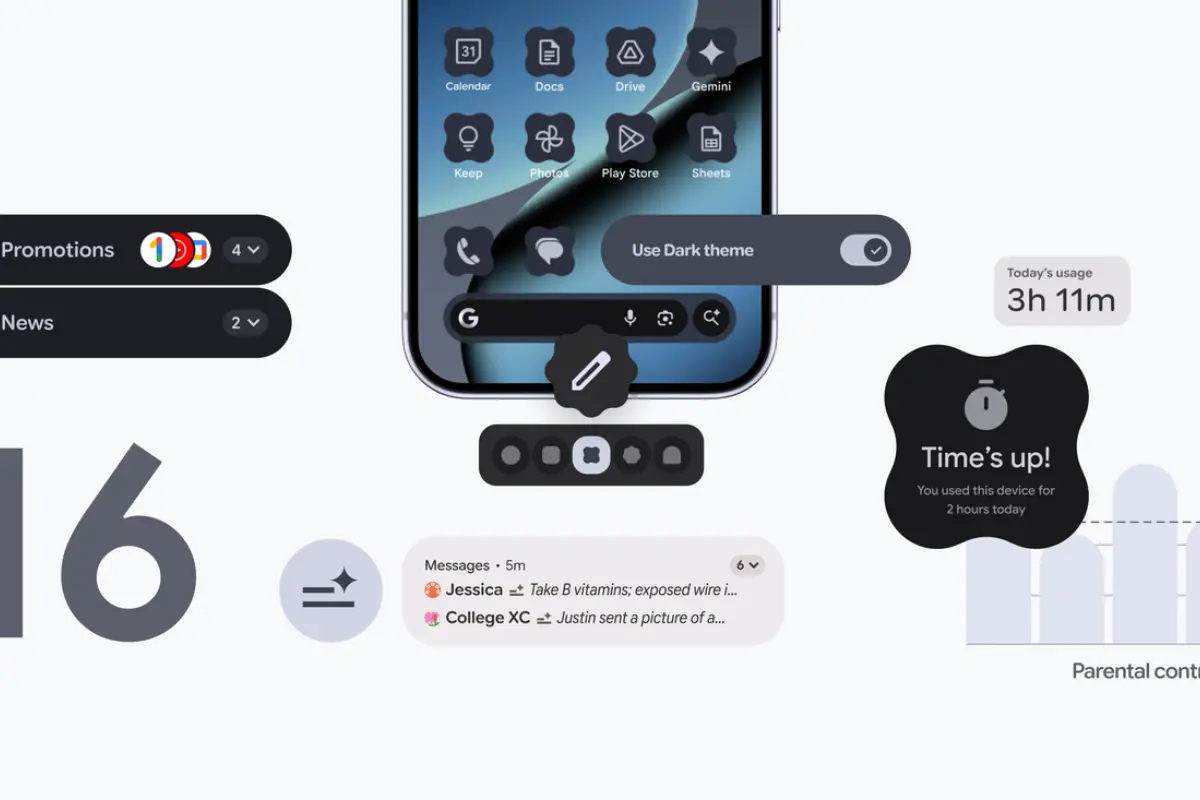
Android 16 introduces several new improvements that focus on intelligence, personalization, and smoother daily usage. The update brings AI-powered tools, stronger privacy protections, and deeper customization options that make the overall experience more modern and efficient. This review covers everything new in Android 16, written in a direct format similar to preparing a blog inside WordPress or Notepad.
AI Notification Summaries
One of the biggest additions in Android 16 is the AI notification summary system. Instead of reading long or cluttered notifications, the phone automatically creates short summaries. This helps users scan updates without opening multiple apps.
The AI system identifies important parts of incoming messages and removes unnecessary text. It works across messaging apps, emails, and other services that send frequent alerts. This reduces notification overload and keeps the status bar cleaner.
Over time, the system adapts to user habits, highlighting updates that matter most while lowering priority for repetitive alerts.
Expanded Customization Options
Android 16 continues Google’s push for deeper personalization. The update introduces new lock-screen layouts, redesigned widgets, and improved theme controls. Users can change font weight, icon shapes, color palettes, and quick-access modules directly from the customization dashboard.
The wallpaper generator also receives improvements, allowing dynamic themes that adjust according to the time of day or the selected style. The Material You system extends to more apps, making the interface visually consistent.
These customization features help users shape the device exactly to their needs without third-party launchers.
Performance and System Optimization
The update improves system performance across the UI. Animations feel smoother, app switching becomes faster, and memory management is more stable. Background processes are handled more efficiently, which helps the phone stay responsive even when running multiple applications.
Android 16 also enhances battery consumption models. The power-saving system identifies apps that drain too much energy and controls background tasks more aggressively. This gives users longer screen-on time without sacrificing performance.
Better Security and Privacy Controls
Another major focus of Android 16 is privacy protection. The update adds new permission management tools with clearer controls for location, microphone, and camera access. Apps requesting sensitive permissions must explain their purpose more directly before being approved.
The update includes a new privacy dashboard layout with detailed activity logs. Users can now see how often apps access sensors and restrict them instantly. System-level protections help block suspicious background activity, strengthening overall device security.
AI-Assisted System Tools
Android 16 expands Google’s AI integration beyond notifications. The update includes AI suggestions inside settings, search improvements within the device, and smarter text prediction across the system keyboard.
The on-device search becomes faster and more accurate, identifying files, messages, and apps instantly. Users also receive AI-driven support during setup, which helps them organize permissions, layout, and recommended features.
These enhancements reduce the time needed to configure or troubleshoot the device.
Improved Multitasking and App Experience
Multitasking sees several upgrades. The split-screen mode becomes easier to activate, with smoother resizing and better app compatibility. Recent apps are now displayed with clearer previews, making navigation faster.
Apps optimized for large screens also benefit from Android 16, especially for tablets and foldable devices. The update introduces enhanced windowing tools, providing users with greater flexibility when running multiple applications simultaneously.
Sharing Files From a Pixel Phone Feels Absolutely Amazing Now
Apple’s App Store Overrun by Fake ‘Sora’ Apps — Some Still Active!”
Is Android 16 Worth the Upgrade?
Android 16 delivers meaningful improvements. Its AI notification summaries reduce clutter, the customization tools offer more control, and the performance upgrades create a smoother experience. Privacy enhancements also make the system safer to use.
Users who rely heavily on messaging, multitasking, and personalization will notice the biggest difference. The update continues Google’s strategy of blending intelligence and usability into one consistent interface.