
PaintTool SAI App Review: Price, Features, and Pros & Cons
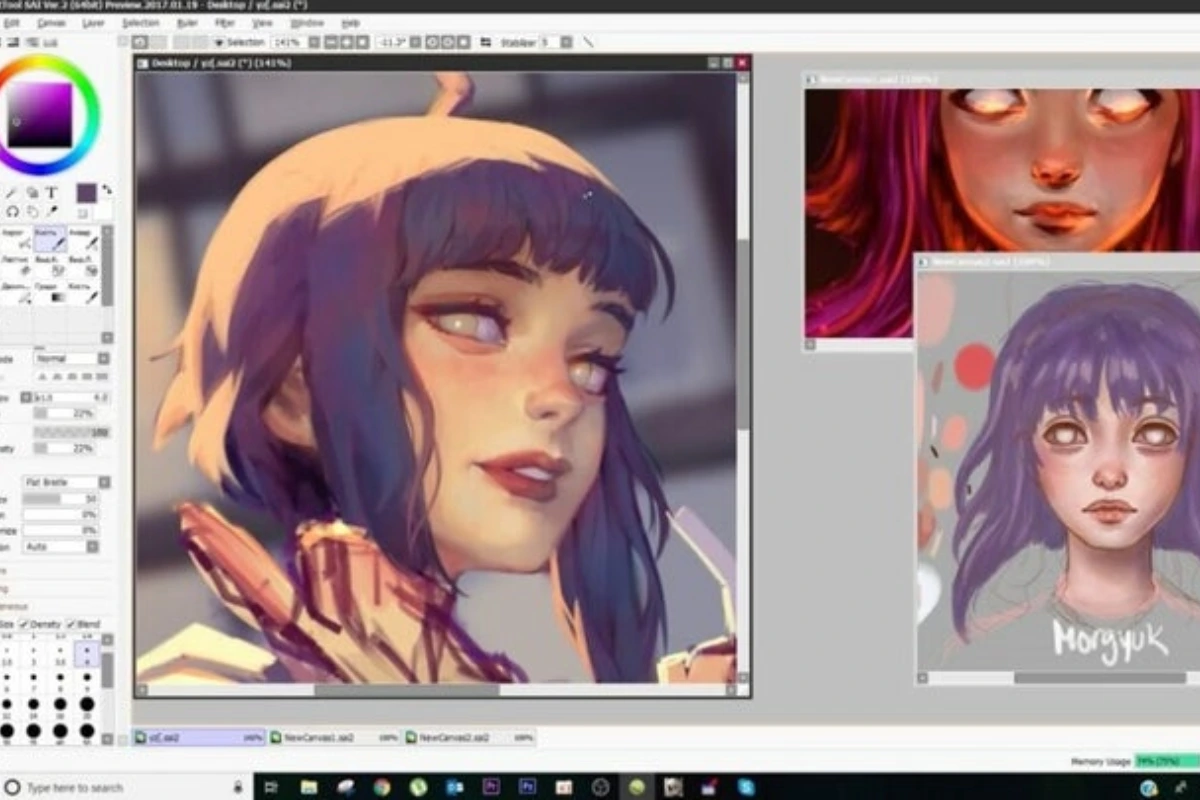
PaintTool SAI is a popular digital painting software used by artists all over the world. It is especially loved by anime, manga, and illustration artists because of its smooth brushes and simple interface. Unlike heavy design tools, PaintTool SAI focuses mainly on drawing and painting.
Many beginner and intermediate artists choose this software because it is easy to learn and runs well even on low-end computers.
What Is PaintTool SAI?
PaintTool SAI is a lightweight digital art program developed by a Japanese developer. It is mainly designed for drawing, sketching, line art, and coloring.
The software is not meant for photo editing or graphic design work. Instead, it focuses fully on hand-drawn artwork using a pen tablet or mouse.
It works only on Windows systems and is widely used with drawing tablets.
PaintTool SAI Price and License Details
PaintTool SAI is paid software, but it is affordable compared to many professional art tools. The official license price is around $50 USD for a lifetime license.
Once you buy it, there are no monthly or yearly subscription fees. This makes it attractive for artists who do not want recurring payments.
A free trial version is available on the official website, but it has limited features.
Key Features of PaintTool SAI
One of the biggest strengths of PaintTool SAI is its brush engine. The brushes feel smooth and natural, especially when using a pen tablet.
The software offers clean line tools that help artists create sharp and professional line art. Many comic artists prefer SAI for inking.
Layer management is simple and effective, making it easy to color and adjust artwork step by step.
Pros And Cons
| Pros | Cons |
|---|---|
| Smooth and natural brush engine for digital drawing | Available only for Windows, no macOS support |
| One-time purchase with no subscription fees | Lacks advanced photo editing tools |
| Lightweight and runs well on low-end PCs | No built-in text or typography features |
| Easy-to-use interface suitable for beginners | Limited updates compared to newer art software |
| Excellent for line art, inking, and anime-style illustrations | Not designed for graphic design or layout work |
Brush and Drawing Experience
PaintTool SAI is known for its stabilization feature, which helps smooth shaky lines. This is very useful for beginners and people with unsteady hands.
Custom brushes can be created and adjusted easily. Artists can control pressure, size, and texture without complex settings.
The drawing experience feels responsive and fast, even on older computers.
Interface and Ease of Use
The interface of PaintTool SAI is clean and simple. There are no confusing menus or cluttered panels.
Tools are easy to find, and the workspace can be customized based on personal preference. This makes it friendly for first-time users.
Because of its simplicity, artists can focus more on drawing instead of learning the software.
How to Use PaintTool SAI (Beginner Guide)
To start using PaintTool SAI, you first need to install it on a Windows computer. After opening the software, you can create a new canvas and choose your canvas size.
Artists usually begin by sketching with a pencil or a brush tool. After that, line art is done on a new layer.
Coloring is added on separate layers below the line art, making edits easy and clean.
Working with Layers and Colors
Layers in PaintTool SAI are easy to manage. You can rename, lock, and group layers for better organization.
The color wheel and palette tools are simple but effective. Artists can quickly pick colors and save them for later use.
Blending colors feels smooth, which helps in shading and soft coloring styles.
Performance and System Requirements
PaintTool SAI is very lightweight compared to other art software. It runs smoothly on most Windows PCs, even with limited RAM.
The software opens quickly and rarely crashes. This makes it reliable for long drawing sessions.
Because it uses fewer system resources, it is ideal for older laptops and low-spec systems.
CoverFlowFinder vs Google Photos: Which One Is Better for You?
Limitations of PaintTool SAI
PaintTool SAI does not support macOS or Linux. This is a major limitation for some users.
It also lacks advanced features like text tools, photo manipulation, and complex filters. These features are found in software like Photoshop.
However, these limitations are acceptable because SAI is focused only on drawing.
CoverFlowFinder App for Android: What It Is and How It Really Works
Who Should Use PaintTool SAI?
PaintTool SAI is perfect for beginners, hobby artists, and manga or anime illustrators. It is also great for artists who want a simple and distraction-free drawing tool.
Professionals who only need drawing and inking tools may also enjoy it.
It is not ideal for graphic designers or photo editors.
In Short
PaintTool SAI is powerful yet simple digital painting software. It offers smooth brushes, clean-line tools, and a beginner-friendly interface.
With a one-time affordable price and no subscription, it remains a favorite choice among digital artists.
If your main goal is drawing and illustration, PaintTool SAI is definitely worth trying.