Acer’s Spin 514 Review: So Close to Chromebook Greatness
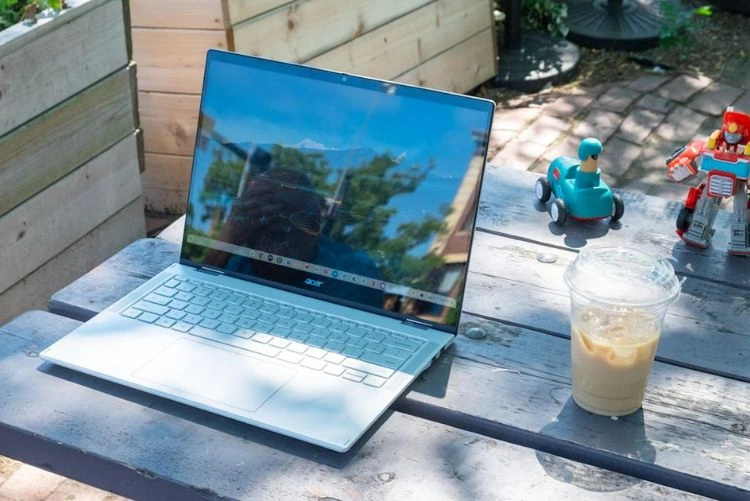
When Acer first introduced the Chromebook Plus Spin 514 (2025), the reaction was the same across the tech community: “Finally, a Chromebook that looks good, performs well, and brings modern AI features without costing a fortune.” After spending time with it again with the latest 2025 updates, the Spin 514 still holds up impressively well. It’s not flawless, but it comes very close to being one of the top Chromebooks you can buy this year.
Here’s the updated breakdown in simple, normal words of what’s new, what’s improved, and whether the Spin 514 is worth buying in 2025.
What’s New—Updated 2025 Specs & Features
The 2025 model of the Spin 514 runs on MediaTek Kompanio Ultra 910, a chip built specifically for ChromeOS and AI-assisted tasks. It’s the first time Acer has used this processor in a Chromebook, and it’s a big reason behind the smooth performance.
Latest specs at a glance:
-
Processor: MediaTek Kompanio Ultra 910
-
Display Choices:
• 14-inch 1920×1200, 120 Hz
• 14-inch 2880×1800 (WQXGA+), 60 Hz -
Battery: 70 Wh (up to 17 hours claimed)
-
Connectivity: Wi-Fi 7, Bluetooth 5.4
-
Stylus: Supports USI 2.0 pens
-
Weight: Around 1.36 kg
-
Body: Aluminum top, 360° hinge
These upgrades make it one of the more future-proof Chromebooks in Acer’s lineup.
Design & Display—Updated Experience

The Spin 514 still feels premium the moment you open it. The 360-degree hinge is tight, smooth, and durable; switching between laptop, tablet, and tent mode takes almost no effort.
The 14-inch display continues to be a strong selling point. The 16:10 ratio gives you more vertical space when reading, writing, or browsing. Colors are good, text is sharp, and the overall panel quality is solid. The 120 Hz variant feels noticeably smoother, especially for scrolling and animations.
The only downside? In very bright outdoor sunlight, the screen could use a little more brightness. Indoors, though, it’s perfectly fine.
Acer still doesn’t include a fingerprint reader, and the speakers remain “good enough” but nothing special. For the price, you might expect slightly better audio.
Performance—Faster & Smoother With ChromeOS AI
The Spin 514 truly shines in everyday use. The Kompanio Ultra 910 chip handles ChromeOS exceptionally well. With the latest ChromeOS AI features rolled out in 2025, things feel even snappier:
-
Documents + browsing + YouTube + music? No slowdown.
-
Multiple Chrome windows with 20+ tabs? Still smooth.
-
Light photo editing and AI-assisted suggestions? Surprisingly quick.
The cooling fan helps keep performance consistent and prevents thermal throttling during long work sessions. The laptop rarely gets loud, and most of the time, you won’t even notice the fan running.
Connectivity is future-proof too: Wi-Fi 7 makes stable connections even in crowded networks, and the two USB-C ports support charging and external displays.
Also Read:
- Steam Machine Release Rumors—What’s Confirmed
- MSI Crosshair 16 HX AI Laptop Review with Price – 2025 Edition
Battery Life—Updated Real-World Numbers
Acer’s claim of 17 hours is, as always, under ideal conditions. But in real-life usage:
-
A full day of work (8–10 hours) is no issue at all.
-
Light use (web + notes + low brightness) can push it closer to 12–14 hours.
-
Streaming and multitasking bring it closer to 9–10 hours.
For students, travelers, and hybrid workers who don’t want to carry a charger everywhere, this is one of the standout Chromebooks of 2025 in battery endurance.
Pros—What the Spin 514 Does Really Well (Updated)
The updated model continues to offer:
-
Strong performance for ChromeOS and AI features
-
Excellent battery life
-
Premium-feeling convertible design
-
Modern connectivity (Wi-Fi 7, BT 5.4, USB-C)
-
Sharp 16:10 display with optional 120 Hz
-
Reliable cooling system with minimal noise
Its combination of build quality, portability, and smooth everyday performance makes it feel more expensive than it actually is.
Cons—Things That Still Need Improvement
Even in 2025, the Spin 514 has a few drawbacks:
-
No fingerprint sensor still a surprising omission
-
Speakers are average
-
Brightness could be higher for outdoor use
-
Higher-end display options push up the price
-
Some versions may have limited RAM/storage depending on the region.
Nothing here is a deal-breaker, but these limitations matter depending on your use case.
Where It Fits in 2025—Who Should Buy It?
You should consider the Acer Chromebook Plus Spin 514 if you:
-
Mostly use the web, documents, video calls, and media
-
Want a 2-in-1 Chromebook for drawing, note-taking, or tablet use
-
Need long battery life
-
Work or study in multiple places during the day
-
Want modern features without paying high-end prices
However, if you’re someone who:
-
Requires extremely bright displays for outdoor work
-
Wants top-tier speakers
-
Does heavy creative work (video editing, large projects, etc.)
…you might want to consider more powerful Chromebooks or full Windows/Mac laptops.
Still One of the Best Chromebooks in 2025
The Acer Chromebook Plus Spin 514 (2025) remains an excellent all-rounder. It delivers great performance, smooth ChromeOS AI features, reliable battery life, and a flexible convertible design. It’s not perfect; missing features like a fingerprint sensor keep it from being the absolute best, but overall, it offers one of the most balanced and reliable Chromebook experiences in 2025.
If you want a powerful, modern, versatile Chromebook that can handle almost anything your daily life throws at it, the Spin 514 is still one of the smartest choices this year.